Self-hosted Obsidian sync · iOS & iPadOS
Your Obsidian vault, finally in sync on iPhone.
VaultSync syncs your notes peer-to-peer over Syncthing, straight into Obsidian’s iOS sandbox. No note cloud. No account. No in-app tracking.

The sync itself is free — fully peer-to-peer over Syncthing, with no note cloud in between. Cloud Relay is an optional wake-up push for faster server → iPhone updates.
How it works
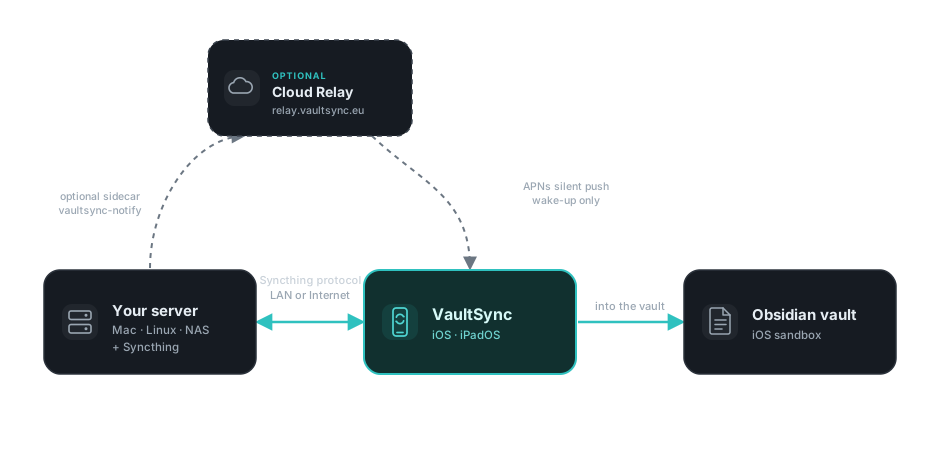
Your server syncs peer-to-peer with your iPhone.
Syncthing runs on a machine you keep on. VaultSync joins as a peer and writes notes into Obsidian’s vault — no note cloud sits in the middle.
Peer-to-peer & private
Notes move directly between your own devices over Syncthing — on your LAN or across the internet, encrypted in transit. No third-party note cloud, no account.
Lands in your vault
Files sync into Obsidian’s iOS sandbox — exactly where the app already looks for them. No Siri shortcuts, no fragile workarounds. Open Obsidian; your notes are there.
Outsmarting iOS, quietly
iOS won’t let any app sync in the background — that’s Apple’s rule, not ours. Cloud Relay’s clever workaround: the moment your server changes, a tiny content-free push wakes VaultSync just long enough to pull the new notes. The payoff is near-instant incoming sync iOS otherwise won’t allow — and the relay still sees only a Device ID and a push token, never your notes.

Set up in minutes
Pair once. Then it just keeps your vault in sync.
Step 1
Pair your server by QR
Scan your Syncthing Device ID — or paste it — then accept the connection. No keys to copy by hand.
Step 2
Notes land in Obsidian
VaultSync detects your vaults, connects the share, and runs the first sync — straight into Obsidian’s sandbox.
When it matters
Resolve conflicts with diffs
Edited the same note in two places? Settle Markdown conflicts with a clear side-by-side diff — you stay in control.
Always visible
Activity timeline & diagnostics
An activity timeline and diagnostics show exactly what synced and when — never status by colour alone, always an icon and label.
An honest comparison
How VaultSync compares — including where it doesn’t win.
Every sync tool trades something. Here’s the short version; the full breakdowns live on the comparison pages.
| VaultSync | Möbius Sync | Obsidian LiveSync | Obsidian Sync | iCloud | |
|---|---|---|---|---|---|
| Setup effort | QR pair · minutes | Siri-shortcut step | Run CouchDB | None | None |
| Real-time sync | Near-real-time * | On trigger | Yes, real-time | Yes | Eventually |
| Lands natively in Obsidian (iOS) | Yes, sandbox | Sandbox workaround | Yes, plugin | Yes, native | Varies |
| Data path | P2P, no cloud | P2P | Your CouchDB | E2E cloud | Apple cloud |
| Open source | MPL-2.0 | No | Yes | No | No |
| Price | Free · Relay optional | Freemium · paid Pro | Free (self-host) | Subscription | Free tier |
* Near-real-time when Cloud Relay delivers a wake-up; otherwise on the next app open. iOS throttles background delivery.
Cloud Relay · optional
Want your iPhone to wake on its own? Add Cloud Relay.
Without it, VaultSync syncs server changes when you open the app. With it, a silent push nudges your iPhone the moment your server changes — even while VaultSync is closed.
Privacy by design
The relay is a wake-up service, not a note cloud. It routes a push and nothing more.
Cloud Relay
Optional in-app subscription.
Prices shown in USD. Your local App Store price may differ. A free trial badge appears in the app when a trial is available.
Turn it on in about two minutes
Subscribe in the app, then run this one-liner on the machine that runs Syncthing. The installer finds your Syncthing config and sets everything up — Docker or a native service, whichever fits your machine.
curl -fsSL https://vaultsync.eu/notify.sh | shNothing to edit, no API key to copy. Skeptical of curl | sh? Quite right — append -s -- --dry-run to preview every step without changing anything, or read the script first.
Built in the open
An independent project, developed in public under MPL-2.0.
VaultSync is made by an indie developer and built on the shoulders of Syncthing and gomobile. The full source, changelog, and privacy policy are on GitHub — read exactly what runs on your devices before you install it.
Bring your vault to your iPhone.
Free, peer-to-peer, and open source. Pair your server by QR and your Obsidian notes are there.